Hi,
Is there a way to export the user presets? I’d like to be able to put them on another of my computers.
Or perhaps just the location of them in the file system (if they actually exist in that form!) 
Many thanks
David
Hi,
Is there a way to export the user presets? I’d like to be able to put them on another of my computers.
Or perhaps just the location of them in the file system (if they actually exist in that form!)
Many thanks
David
Are you using KICK 2 or KICK 3 are the 2 computers Windows PCs or Macs ?
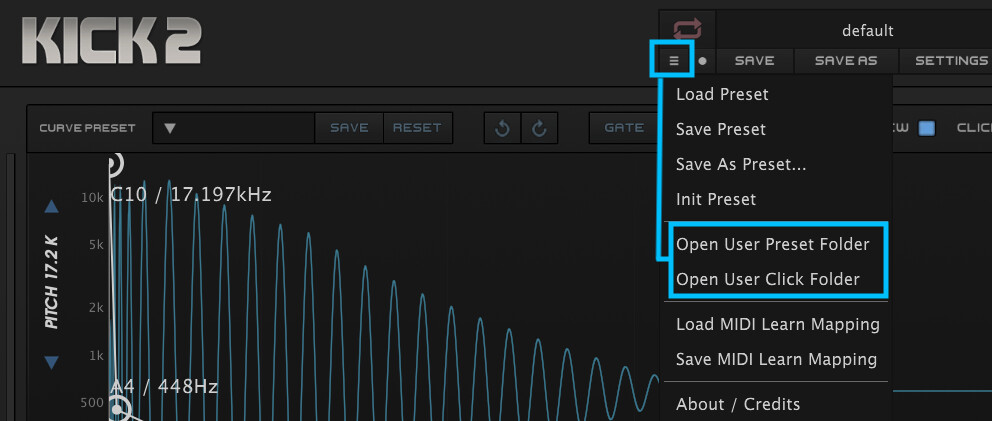
Ultimately, you should be able to reveal both your User Presets and User Clicks folders from KICK 2 or KICK 3 Pull Down Menu and copy those entire folders from one computer to another.
You want to make sure that you have the same plugin version installed on both computers.
Hope this helps !
Cheers 
the perfect answer! Thanks so much
both macs using Kick3, fairly standard stuff.
Question, New user Kick 2 Mac Mini is full of plugins . Is there a way to download and install all my Nicky Romero presets to my external hard drive instead of using my Macs hard drive ? I am trying to save same space.
Hey there @Freddiedamor
Sorry for the delayed reply over the Holidays 
The files structure and where presets and samples are saved is predefined, therefore the only possible workaround if you’d like to move presets location is to use Symbolic Links ( you could actually move your entire KICK 2 folder or Presets folder using this method ).
However, keep in mind that this is not officially supported, you can check this other forum’s post for more information about using Symbolic Links to either move your entire KICK 2 folder or your Presets folder to an external drive. It is highly recommended to have your external drive permanently attached to your Mac ( Always available when you boot your Mac ) otherwise you’ll break the Symbolic Link. Think about “Symlinks” as permanent shortcuts if that makes sense 
Hope that helps