I’m having two pretty big issues with Ana 2 in Ableton 12.
- Having the plugin/ui window open, is causing cracks and pops in playback, UNACCEPTABLE!
Tried alot of fixes… setting my monitor to 60hz… hidpi mode off… hdr off… various windows/graphics settings, several samplerate buffer usecases… but I am not running a high latency mode, while im performing and recording/producing, and it didnt fix the problem…maybe i should take gpu renderer off in ableton? Ill try, but I’d rather not run ableton with it off. Am I really the only one with this problem? Closing the pluigin window fixes the problem so… its a weird/annoying one, the problem doesnt seem rampant with other plugins. Fix via. update would be nice if possible. edit: I tried running with gpu renderer off… that seems to fix the issue actually. Im using a 4k samsung tv monitor with freesync 144hz hdr qn90ca on a ryzen 5 32gb 6700xt system
- Some presets dont work for some reason? how to fix?
Hey there @complexconf
1. Not 100% sure but I believe Windows does not recognize Ableton as default to take advantage of the GPU render performances. So it might still be taxing your CPU instead and therefore affect DSP usage and performances.
You may want to try the following in Windows :
→ Right click the desktop and choose Display Settings :
→ Scroll to Graphics Settings at the bottom
→ Browse to the Ableton 12.exe file and select Options to ensure Windows is using the High Performance GPU by default.
→ After doing this, the new GPU Renderer should be working as intended hopefully ?
Hope that helps ! Please let us know 
2. Some Presets Not Working :
What exactly do you mean by not working ?
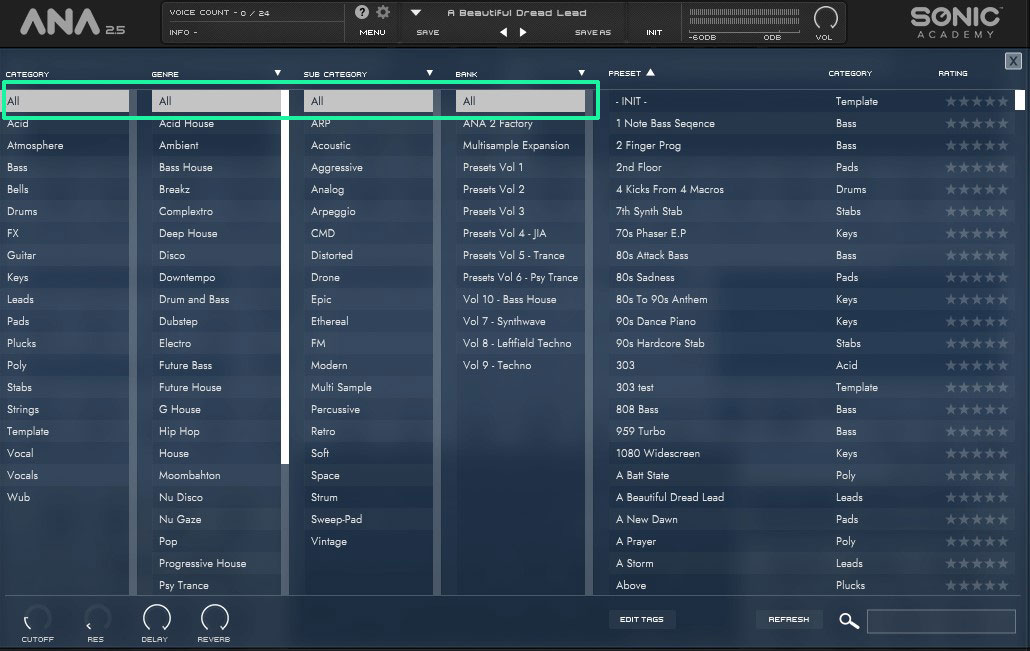
Are you maybe seeing “greyed out” presets names inside the Presets Browser & can’t load them ?
If that’s the case, then it’s likely because you’re filtering the presets search results inside the Presets Browser, make sure to set all filters to “ALL”
We need more details & Presets Names that are not working if you’re experiencing a different issue.
Thx for the reply, i figured out how to fix the “bug”.
But for the presets, at least the OB6 poly presets in Vol 7 . Synthwave preset pack dont work!?
Can’t replicate this here I’m afraid 
I have no issue playing back any of the 12 OB6 presets from the Synthwave Vol.7 pack with the ANA 2 interface open, even with higher audio settings at 48000 Sample rate & 256 Buffer size ( it 's recommended to use 41000 SR and 512 BF ).
I’d make sure Windows is up to date, as well as your graphic card and audio card drivers.
You may want to try to re-download and re-install ANA 2 v2.5.6 as well as the Presets Packs Vol.7
It’s quite difficult to nail down what could be causing this issue without knowing your system specs details and audio setup TBH, if you keep having problems with this, best is to send an email to support and let them know your system details and provide them with a video showing the issue or at least screenshots showing your Audio Setting inside Ableton Live and the CPU Meter.
If you reach support, please provide them with the following details :
Windows Version Installed.
Your CPU model and amount of RAM Installed.
Your Graphic Card model.
Your Audio Card model and if using ASIO drivers or dedicated drivers for your card ?
Any MIDI Controller or Keyboard attached ( and does it makes any difference if you unplug them ? )
Ableton Live version installed and your audio settings inside Live.
ANA 2 Version Installed and are you using the VST2 or the VST3 plugin instance ?
This can also be project resources dependent of course, so let them know if this is already happening inside a brand new Ableton Live project ( with only ANA 2 running ) or in a much complex project with multiple tracks and other plugins running or a live performance setup with multiple plugins as well.
You’ll find a guide to a manual CLEAN INSTALL for ANA 2 on Windows in this support page thread ( be aware that a manual Clean Install will delete any user presets you may have, so be sure to back up your User Presets folder before trying this ).
Hope this can help further.