I try to keep these courses as close to my actual production process as possible. Sometimes I do jump around but that’s how I actually do things in the studio from time to time. As for the amount of plugins, unfortunately its the same thing… it wouldn’t be reflective of how I make my music without using the tools I normally do. That said, I use a lot of Plugin Alliance plugins… they have a great subscription model which will get you everything in their catalog.
Thanks Nate for an amazing insight into your production process. I learnt alot! Looking forward to your next courses.
1 Like
is there any way to create the bass not using falcon?how?
Hey there @BorjusG
You can get similar results using a sine in the Sub OSC from Kick 2, here is my attempt to recreate a similar sound & some midi clip playing a C0 16notes/15% groove generated in Ableton’s Live. Again, similar sub-bass sound, didn’t spent too much time getting the exact same result but you can design it with Kick 2.
Basically you use a Sine in the SUB Osc and tune it to C4 and then play with the nodes in the pitch section & tweak the amp section decay and adjust the length, then use the EQ & distortion to give it more grit.
Kick2_Proto_Sub-Bas.preset (5.3 KB)
Proto_Sub-Bas.mid (175 Bytes)
Thanks Nate!
That was a really fun course to follow and learn from.
Cheers for using Falcon! I just got it for Christmas 
Love Protoculture’s courses - looking forward to the next one. So many new techniques and tips to learn. First time I’ve used granular synthesis to create drones, although I used Cumulus for this. My take on this track - Progressive Trance 2019 - YouTube
Ah what a shame it’s missing his process for creating chord progressions and melodies #sadface
Great course otherwise!
Great course. I learned a lot!
I don’t have much of a ‘process’ per se. I’ve seen a lot of guys doing tutorials where they sort of over analyze everything as far as chord structure is concerned, but I really just sit down and play stuff till it sounds good. I’m fortunately blessed to be able to play a lot of stuff live on the keyboard and just hit record. I find it hard to explain why I go for certain chords… it’s more just feeling and intuition more than anything else.
Cool swing tip on the free Kick Video! Thanks!
Hey Protoculture, any progress on re-uploading a version of the project file with 24-bit audio files? Or any advice from anyone here about good free software to use to convert 32-bit audio files to 24-bit? Thanks!
Audacity should be able to do this.
1 Like
Yep, good point with Audacity as a free software to achieve this.
BTW, I did put a ticket with Ableton Support about this & they came back to me telling that this has been escalated to their development team among other similar requests but no confirmation of a future fix until now.
They also asked me to test the following : trying to convert those 32bit files to 32bit Floating Point and import them into Live again. I had a failure with “Fission” under MacOS but it did work with “iZotope RX7 Audio Editor” and I think that Audacity should be able to do the same conversion according to the Import/Export features from their site, you can also give this a try @Toryn and if that’s working then you have a chance to retain the 32bit files format inside Live.
Thanks Nate. Great course and lots for me to work on.
Great insights as always
Hi there, What is the Swing Percentage (15%) that protoculture is kept putting his Audio’s at and midi too I believe. is it for rhythm? any links so i can understand this better in my DAW ( I use Logic pro x) Thank you !
Yep, swing is usually used to add variation to your beats. Basically what’s happening is that the midi or audio affected by a certain amount of “swing” will be slightly moved from their original position. That will result in a more “human” playback timing, giving your beat ( or other instruments ) a different groove.
For Midi you can just select the regions or notes you want to affect and use the “Swing” amount value paired with the Q-Strenght ( Quantization Strenght ) value, it’s set to max 100 by default.
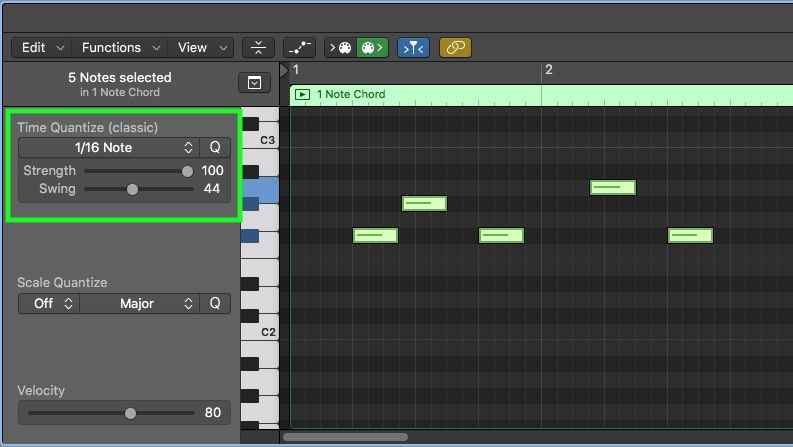
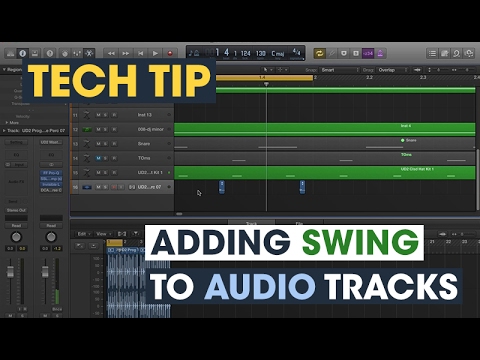
For applying swing to Audio Tracks, check this Tech-Tip from Chris here :
Very nice and detailed course from Protoculture. Im happy with the content. Keep up the good work.
Took me a while to get through the whole course, but well worth it… learnt a lot… Thank you very much
Uoool