2:31 - Some’ll win, some will lose
Some are born to sing the blues
Whoa, the movie never ends
It goes on and on and on and on
love it . Thanks Craig !
1 Like
Really good tutorial!
1 Like
Thanks for your comment and welcome to the forums ! 
1 Like
This is the best course I’ve ever bought - I’m enjoying it so much! Thanks Craig! 
1 Like
Craig Connelly has been my inspiration since I was a senior high student back in 2019. Time flies, and here I am, following his step into the world of music production.
1 Like
This has been such a great breakdown of how Craig creates his vocal trance . the fact he shows us not just his structure but also his sound design and techniques is very inspiring and really great to see. Mixdown section just shows what you can achieve when you put in hard work from the ground up. great work thank you sonic academy and Craig for this
1 Like
I’m only at video no. 04 right now. But I’m really looking forward to learn a lot of things. Coming from teh rock side of things I didn’t know how much those vocal trance music would be able to catch me. I love that style like Craig Connelly, Gareth Emery and singers like Christina Novelli. It’s transporting “vibes”. I love it! I’m very keen on learning how to do that stuff.
1 Like
i learned a lot
1 Like
Thank you man! I love your music and learning from you feels like a peek inside the secret for life haha
1 Like
That ultra pad sound is great! Where can I get it?
Would help if you could please point at a Video Number/Title and a time frame.
Cheers
“How To Make Vocal Trance with Craig Connelly Tutorial 04 - Chords and Bass Notes” at @01:02
Thank you for clarifying.
It’s actually a patch for Xfer Serum unfortunately, can’t really help with that I’m afraid 
I thought you were after a ANA 2 preset.
I could have a go at making it in ANA 2
@18:45 on How To Make Vocal Trance with Craig Connelly Tutorial 12 - Kick Processing and Bass Lines (Part 1), I can’t figure it out in my mind on how to set this up in Ableton Live 12. I got as far as grouping the Mid Basses, but I haven’t been able to work it out from there. If there’s someone here familiar with Ableton that can help, I’d appreciate it. I’m sure I’m making it more complicated than it is.
Hey there @vinsanity982
So yeah, inside Ableton Live you can “GROUP” tracks which is the same, but we don’t have so called “Bus” tracks like in Avid Protools or Logic Pro.
Let’s say you’d like to create a DRUMS BUS inside Ableton and send all your drums channels ( tracks ) into that “bus” : simply select all your tracks and press Cmd + G on a Mac ( Windows Key + G on a PC I believe ) to group all your drums into 1 new Group, that’s your “Drums Bus” where you sum all your drums before going to the master channel ( Useful to process drums all-together ) 
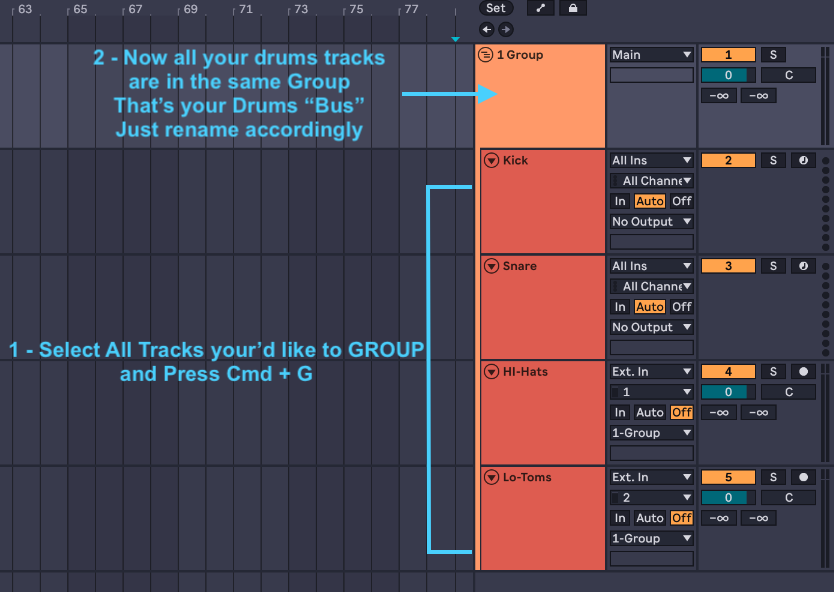
Hope that helps !
Cheers
Thanks for the help!
1 Like
I would personally like to thank craig for the extensive course the boy put in alot of hours i maybe im wrong but this is one of the longest courses on the site so thanks for giving up your time man and making an extensive course
1 Like
I’ve learnt so much from this course thank you!
1 Like