It’s an honour and pleasure!
1 Like
Hey @ForeverSeason , thanks for the kind words on the course! It is genuinely nice to hear that my approach to teaching connected with you, and you are diving into your Ableton Live journey. Best of luck moving forward with your music, and please do spread the word about the course. I’m looking forward to putting out some more tutorials on Sonic Academy soon!
3 Likes
Really good course, thank you. As was the previous level. P-LASK is an excellent teacher, very thorough in his explanations, and covers a wide range of topics.
2 Likes
great course!
2 Likes
Awesome course!!!
2 Likes
Thank you!! Amazing class, I learned a lot
2 Likes
fantastic follow on from level 1, took what I already thought was banging and just polished the hell out of it, really interesting and useful stuff, thanks!
2 Likes
Ahh. It’s P-Lask. I’m glad I clicked on this. I like his teaching style.
2 Likes
These beginner courses were awesome, thanks so much! The production beast is feeling a lot less scary now.
2 Likes
I’m an FL user and just getting started with Ableton. I learned so much through both of the courses you put together. You made the experience really enjoyable with a lot of great information about Ableton. The time and effort you put into making these courses is greatly appreciated. Thanks so much!!
2 Likes
Glad it was useful… welcome to the community.
We also have a discord if you want to chat with Sonic tutors or other users
1 Like
Great tutorial, both volumes. Clear explanations, excellent pacing.
2 Likes
Brilliant thanks. I was losing hope in being able to make music after watching other tutorials but yours is really clear and easy to understand while actually making musing instead of twiddling knobs. Thanks
2 Likes
I am really happy to learn that DAW
2 Likes
Hey @Paul_L . After finishing this tutorial, I’m now working through your older tutorials and trying to figure out how to translate the vol/vel parameter change in Simpler for v12. In your older tutorials when you’re using the earlier versions of Ableton, the parameter is Vel > Vol and defaults to 25%. In v12 the parameter is now Vol < Vel and defaults to 45%. As I read the parameter, it’s the same for both, velocity is greater than volume by the percentage, however when I’m using v12 and I import the samples in the earlier tutorials, my levels are lower than what I’m seeing you are getting in the tutorial.
Not sure which older course you’re watching ( might help to get a course name, video title and time frame as a reference ) but as the Info Text mentions inside Live :
Volume < Vel
Simpler’s volume can be modulated by the velocity of incoming MIDI notes. This determines the depth of modulation.
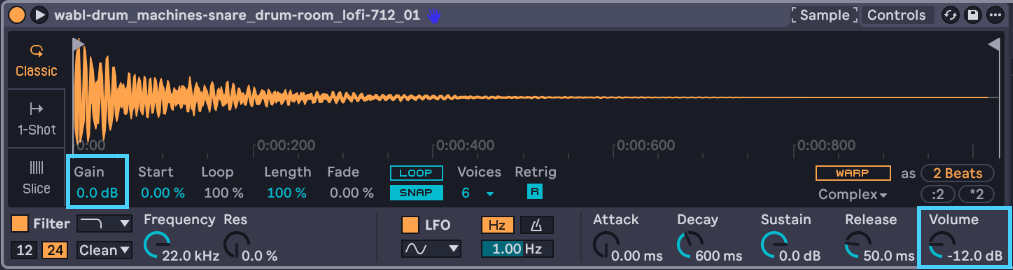
So when different than 0% → Midi Notes velocity will modulate the volume ( So at 0% there’s no Velocity Response at all and you’ll get the same output level whatever your Midi Notes Velocity values are ( i.e : 75 or 127 ), the max output level from Simpler is based on the Volume and also the Sample Gain value you’ve set inside Simpler. And at 100% it will fully respond to Midi Notes Velocity ( i.e with a Midi note at full velocity 127 you’ll get the maximum output level from Simpler, again based on the Volume and sample gain values ).
So you may want to check the Velocity values for the Midi notes triggering Simpler in the course you’re watching.
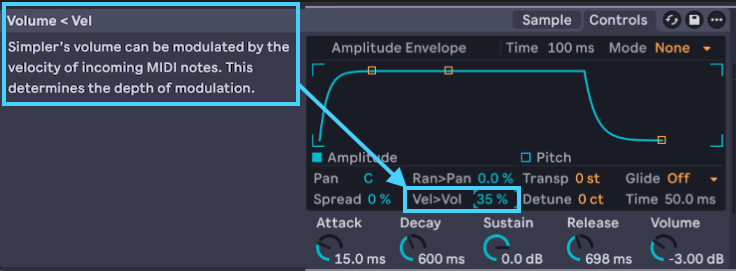
Appreciate the response. In the HTM Deep House 2018 with P-Lask tutorial 4 at 8:50 is when he brings up checking the Vel>Vol parameter and that’s when I noticed that it has been changed for Ableton v12 compared to the version he is using in the video. Since they reworded the name of the parameter in the new version and changed the default values, I wasn’t sure if adjustments were being applied the same between the different versions. Thank you for explaining how this parameter works.
I now see that the discrepancy in levels between my build of the track vs Paul’s is due to the output volume on Simpler. When he opens a new instance of drum rack and loads the samples, the output volume appears to default to -6db. When I open an instance of drum rack in v12 and load the samples, the output volume is -12 db.
1 Like
Yes, the default output Volume for Simpler is -12dB with Live 12, so hopefully just this.
The Vel>Vol parameter works the same as in the older version 
Should be all sorted then 
Do not hesitate to ask any further question ( each course has it’s own forum’s post were you can leave comments )
Cheers 
Hey there, it looks like this has been sorted out, but yes, those Vel>Vol and Vol<Vel parameters are exactly the same, Ableton just changed the order in the control text for some reason. As I recall, in Live 11 and earlier, I had a default setting I used with Simpler that automatically set that parameter to 25%. I stopped using that default setting in Live 12, since I teach so much, and it was confusing students why their values were different than mine (sounds like exactly what happened here, so case in point!).
1 Like