This is the ultimate Logic Pro 12 tutorial for beginners bar none. If you’ve decided to get into producing your own music or maybe you’ve decided to change your DAW and try out Logic Pro 12 for the first time - then this is the course you need to get up and running as we teach you how to use Logic Pro 12 for beginners.
Mixing and Mastering Engineer Larry Holcombe is here with an easy-to-follow step-by-step course to build your very own track from scratch in this Logic Pro 12 beginner tutorial.
From opening the DAW for the first time and navigating the user interface, creating beats, using Logic Pro’s built-in synths to build basslines, synth chord progressions, automation, arranging, and mixing, this course has everything you need to nail how to use Logic Pro 12.
All the resources you need to make this track are included, so you can easily follow along with the samples provided.
This is the definitive beginners guide to Logic Pro 12 from the world’s best online music academy!
I can’t seem to also get the ‘01 drum kits’ that you get on ultrabeat which gives you all the sub-genre options for that instrument. how can i get it? when i click on the ‘manual’ box it won’t list it - just things like ‘copy/load/delete’ etc
By default ( unless you’ve moved the sound library to a different location or drive ) this should be installed in your User Library/Your Username/Music folder.
From your Desktop, either press Shift + Cmd + G or Finder Menu → Go → Go to folder… and Copy/Paste this path with the tilde sign in front : ~/Music/
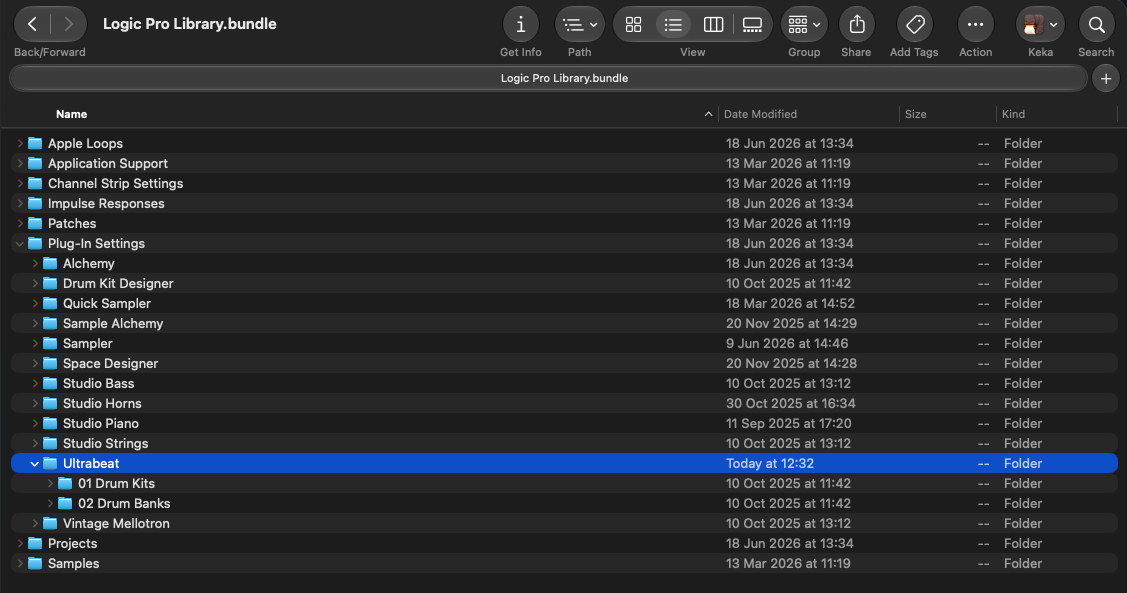
You should find a file Logic Pro Library.bundle in there, if you Right Click on this file and select “Show Package Content” you should find a folder “Plug-In Settings” and a “Ultrabeat” sub-folder with the “01 Drum Kits” and “02 Drum Banks” content.
If the Logic Pro Library.bundle is missing, then it could be that you’ve not yet installed it or not all it’s content. You may want to check this Apple Help Article