Hey guys, i’m loving the plugin, was shared by a mentor for ease of stealing kicks from reference tracks.
I’ve had this problem for awhile now, that any kick i import from an outro, has more sub in it once analyzed and imported. And I can’t seem to get it right lowering the sub or eq out a bit of 50hz, any thoughts on why this is?
I was hoping it’d be cut and paste with removing the hi hat from the sample.
Thanks for your help!
Kirk
Hi there Kirk,
Hard to tell without audio examples and source files to try to reproduce.
Suggest to check/try the following 1st and then shoot an email to support if you’re still having issues. But we’ll need a few examples and include : audio loop part source files, screenshots and saved presets resulting from the analysis, audio files of the presets rendered to audio or a video showing the process from Import/Analysis to end result in KICK 3.
Your system specs :
Mac OS or Windows + Which version ?
DAW Name + Version ?
Are you using the latest KICK 3 V1.1.7 version ?
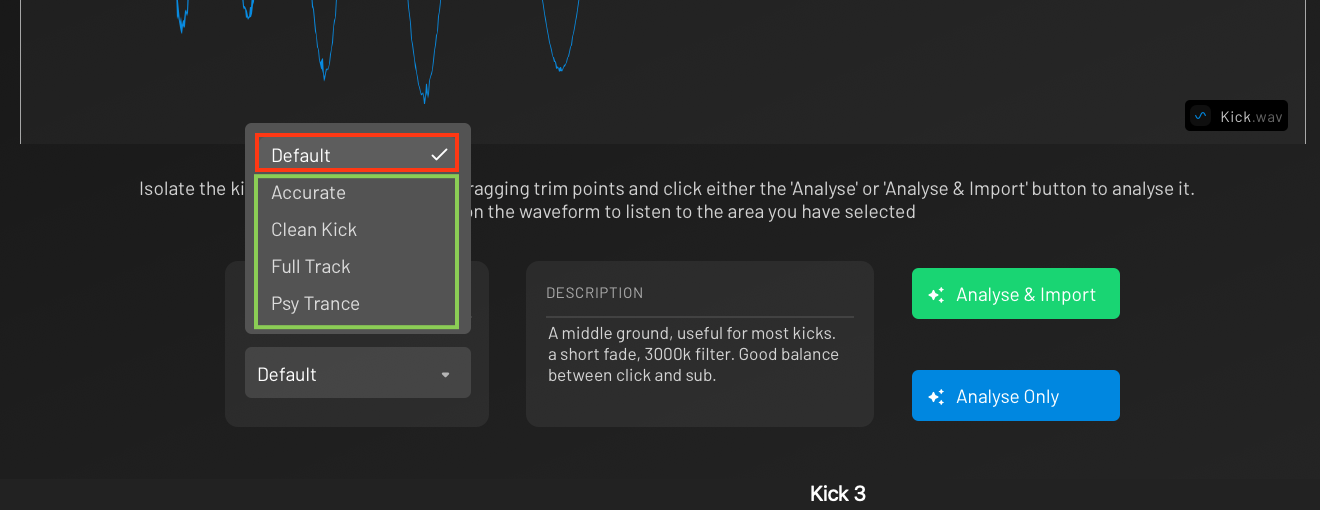
Have you tried to use different analysis algorithms than the default one and compare the results ?
If the kick sample is from a full track loop, you should try to fine adjust the start/end marker to isolate the kick, include as much as transient at the start, try to avoid audio parts with too much overlapping sounds alongside the kick you’re trying to isolate.
Release Notes: V 1.1.7 - 11-02-2026
New Features
- Phaser fx added to FX area
Improvements
Bugfixes
- Fixed velocity sensitivity setting affecting the displayed waveform.
- Fixed plugin size constrain on external displays.
- Fixed potential crash in protools.
- Fixed preset saving not working under certain circumstances.
- Fixed “news” announcements appearing twice in the plugin.
- Improved analysis stability: fixed rare cases where click/sub analysis could produce invalid samples and mute playback.
Thanks for the response, let me share a video!
Shoot, new user says it won’t let me upload the video.
But my exact steps are, i have it in ableton, i have it set as a reference track, going to external out. I pull the kick from outro. Bring it into kick 3, analyze and import, and then i have the sub and click.
i drag the filter down to erase the click and minimize the decay to cut out the hi hat, i have it unlinked to the sub so it won’t affect the low end.
but when i go to compare, this kick, hitting at the same volume as other kick, always has more low end.
thoughts?
You should be able to upload files now 
There’s a few different analysis modes to select…
The default one is a balance between accuracy and giving a more editable sub.
There’s always going to be subtle differences.
If you chose “accurate” mode it will probably be closer but maybe use more nodes and more of the kick will go to the click part.
I usually use default or clean as I like to have a more editable kick after.
Sorry guys, not letting me upload it here, so instead i did a dropbox link.
Do you see anything I’m doing in the video that would cause the imported sample to have more sub in it then the original?
Thanks!
And to compare the A/B, here’s where I’m normally noticing the low end is significantly higher in the low end, note the isolation. However, this time no, so maybe I got it figured out? Honestly didn’t do anything different than in the past.
Hope this helps for context. Apologize for mic being on